NetSuite Single Touch Payroll work is mostly about the boundary between your payroll engine and your ledger. The payroll system calculates pay and lodges STP Phase 2 reports with the ATO. NetSuite receives a journal for each pay run, and finance must prove that the STP figures, the payroll register, the bank payments and the GL tell the same story every cycle.
The trap is to treat the integration as finished once a journal posts. A journal can balance and still put salary sacrifice in the wrong account, miss an allowance category or leave super sitting in a clearing account that nobody reviews. STP reports what the employee was paid. The ledger has to agree with it.
Decide which system is the payroll engine
NetSuite is rarely the payroll engine for Australian companies. Most run an STP-enabled payroll product and integrate it with NetSuite. Some evaluate SuiteApps that run payroll workflows inside the NetSuite environment, such as RubikPayroll, and in that case the country coverage, statutory calculations and STP lodgement need confirming for your pay locations and dates.
Whichever route you take, write down who owns pay calculation, STP lodgement, super payments and the payroll-to-GL journal. If the payroll vendor owns lodgement and your partner owns the journal, the reconciliation between them is yours. For what should flow each way between payroll and NetSuite, with a worked AUD pay run, see our guide to NetSuite payroll integration in Australia.
Map STP Phase 2 pay categories to accounts
STP Phase 2 requires payroll to report pay in separate categories instead of one gross figure. The ATO's list includes gross, paid leave, allowances, overtime, bonuses and commissions, directors' fees, lump sum W and salary sacrifice, with further types inside some of them. Your payroll system already holds those categories. The question is how they reach NetSuite.
Map each pay category to a GL account and decide which segments it carries: department, class, location or project. Overtime by department is a common reporting need, and it is lost if the journal summarizes all wages into one line. Agree the level of detail with the people who read the reports before building the mapping.
Design the pay-run journal and liability accounts
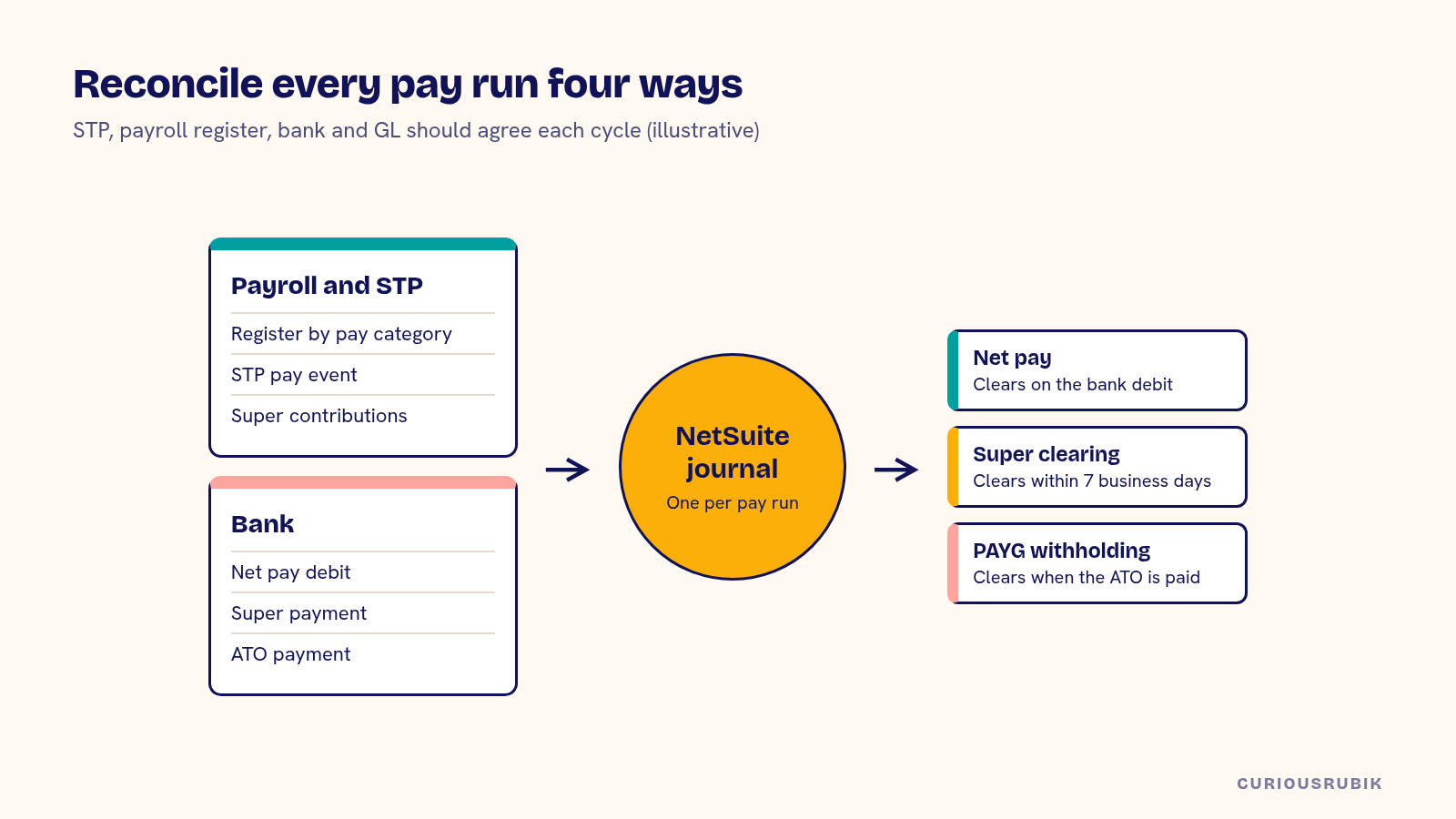
Each pay run should post one journal, or one per entity, with a reference that ties it to the payroll run ID. It should credit separate liability accounts for net pay, PAYG withholding, super and any deductions you remit to third parties, such as salary packaging or child support.
Those liability accounts are where problems show up. Net pay should clear when the bank debit posts. PAYG withholding should clear when you pay the ATO. Super should clear when the contribution leaves your bank. Any balance that doesn't clear within the expected window needs an owner.
Account for Payday Super from 1 July 2026
Payday Super began on 1 July 2026. Employers must now pay super guarantee contributions so they reach the employee's fund within seven business days of payday, with limited exceptions. The ATO has also said that qualifying earnings and the super guarantee liability are reported through STP under the new rules, so check the exact fields with your payroll provider.
For NetSuite, the super clearing account now turns over every pay cycle. Reconcile it each cycle instead of each quarter, and set up an alert for contributions still unpaid after five business days, so there is time to act. Our post on NetSuite superannuation and payroll liability reconciliation covers that routine in detail.
A hypothetical fortnightly pay-run reconciliation
A hypothetical Perth services company pays 140 employees fortnightly. For one pay run, the payroll register, STP summary, bank and NetSuite show the following. All figures are illustrative.
| Line | Payroll register | NetSuite journal | Bank | Status |
|---|---|---|---|---|
| Gross wages, all ordinary time | A$612,400 | A$612,400 | Agreed | |
| PAYG withholding | A$148,900 | A$148,900 | Paid with activity statement | Liability open, as expected |
| Net pay | A$451,300 | A$451,300 | A$451,300 | Cleared |
| Salary sacrifice to super | A$12,200 | A$12,200 | Agreed | |
| Super guarantee | A$73,488 | A$73,488 | A$71,940 | A$1,548 not cleared |
Gross wages, minus withholding and salary sacrifice, equals net pay, so the core journal is right. The super difference traces to three new employees whose fund details weren't validated before the payment file was sent. The payroll officer fixes the member details and pays the balance within the seven-day window. The reconciliation caught it on day two instead of at quarter end.
The example keeps every hour at ordinary time so the super line is easy to follow. Real pay runs include overtime, allowances and leave, and the super calculation base depends on which of those count as qualifying earnings. Let the payroll system calculate it, and have finance check the total against an independent estimate each cycle.
Handle corrections and finalization
Payroll corrections are normal: a missed allowance, a backdated pay rise, a termination paid late. The ATO expects STP errors to be corrected within 14 days of detection, or by the next regular pay event if your pay cycle is longer. Each correction also needs a NetSuite entry in the right period, with a reference to the pay run it corrects.
At year end, employers make an STP finalization declaration by 14 July for most employees. Before finalizing, reconcile year-to-date STP totals by pay category to the GL wage accounts for the full year. The NetSuite EOFY checklist for Australian finance teams puts that step in the June close sequence.
Test the integration before go-live
Run at least two parallel pay cycles before relying on the integration. In each, compare the payroll register, the STP summary, the NetSuite journal and the bank file. Include a termination, a backdated adjustment, an employee with salary sacrifice and a new starter with unvalidated fund details.
Then test failure. Stop the integration for one run and confirm someone notices, and that the run can be posted later without duplicating it. Our earlier post on connecting NetSuite to a payroll provider lists the integration controls in more detail.
Run the NetSuite Single Touch Payroll readiness checklist
Before go-live, confirm each of these:
- Is the payroll engine chosen, with STP lodgement ownership written down?
- Is every STP Phase 2 pay category mapped to an account and segments?
- Does each pay run post one traceable journal with separate liability accounts?
- Is the super clearing account reconciled every pay cycle under Payday Super?
- Is there an alert for unpaid super before the seven-business-day limit?
- Do corrections post in NetSuite with a reference to the original pay run?
- Have two parallel pay cycles reconciled, including edge cases?
- Is the year-to-date STP to GL reconciliation part of the EOFY plan?
A CuriousRubik NetSuite implementation project can make the reconciled pay run an agreed outcome with acceptance tests. When choosing who builds it, ask the questions in how to choose a NetSuite partner in Australia. For the cash side, see Reconcile Australian Payroll with NetSuite Finance and Cash.
Related reading: Preparing the First Payroll and Payment Run After NetSuite Go Live
Frequently asked questions
Does NetSuite lodge STP reports?
Usually the payroll system does. NetSuite receives the payroll journal. Confirm lodgement ownership for your chosen payroll product before design starts.
What changed with STP Phase 2?
Pay must be reported in separate categories, such as allowances, overtime and salary sacrifice, instead of a single gross amount. Your journal mapping should keep the categories finance needs.
How does Payday Super affect NetSuite?
Super liabilities clear every pay cycle instead of every quarter. Reconcile the super clearing account each cycle and watch the seven-business-day limit.
How often should we reconcile payroll to the GL?
Every pay run, with a full year-to-date reconciliation before the STP finalization declaration.
Can corrections be posted in a closed period?
Post them in the period your policy requires, usually the current open period, with a clear reference to the original pay run. Agree the rule with your auditor.