For Singapore finance and project leads who need a clear Friday to Monday cutover, with GST, InvoiceNow and bank file gates.
Last reviewed: 7 November 2026. Product details reflect this review date. Availability and behavior can vary by account, role and release.
A NetSuite go live in Singapore is a planned weekend switch to NetSuite at the start of a GST quarter. You freeze on Friday, load and reconcile final data, prove InvoiceNow and bank files, then open NetSuite on Monday with named stop or go owners. The multi month build is already done. This page covers the cutover itself.
Key takeaways
- Pick the first day of a GST quarter so each GST F5 return comes from one system only.
- Run two dry runs before the real weekend, with the same owners who will work the live cutover.
- Write a rule for InvoiceNow documents still in flight and for CPF payroll journals if payroll is in scope.
- Name one go or no go owner for Sunday night, and keep hypercare staffed for the first week.
What does a NetSuite go live weekend in Singapore include?
A go live weekend is the short window when the business stops using the old system and starts using NetSuite for live transactions. It sits at the end of design, build, data migration and user acceptance testing. Our NetSuite implementation timeline in Singapore covers those earlier stages. This guide starts when those stages are signed off.
Singapore adds four local gates that generic cutover checklists often leave late:
- The GST period boundary, so the next GST F5 is prepared only in NetSuite.
- InvoiceNow (Peppol) documents that were sent or received just before the switch.
- Bank payment files (GIRO and FAST) through the Electronic Bank Payments SuiteApp and Southeast Asia Localization formats your banks have approved.
- The payroll journal and CPF postings, if payroll posts into NetSuite.
Treat each gate as a written stop or go. A feature that "worked once in the sandbox" is not enough.
Print the gate list on one page with each owner name and the evidence you will accept. A bank approval email or a reconciled SGD trial balance both count. Bring that page to the Sunday night meeting so the decision rests on documents, not memory.
How do you pick the go live date?
Choose the first calendar day of a GST quarter whenever you can. Most GST registered businesses in Singapore file an F5 return each quarter, due one month after the quarter ends. If you go live mid quarter, one return is split across two systems and reconciliation gets harder.
A financial year start is cleaner still, because you carry no year to date profit and loss. If that date is too far away, the next quarter start is the usual choice.
Avoid Chinese New Year week and your busiest trading period. Work backwards from the chosen Monday so you still have time for two full dry runs and for the bank to approve a test payment file. Banks often need a week or more.
Confirm the date with finance, operations, IT and your NetSuite partner in one short steering note. Freeze new scope at least two weeks before that Friday.
What must be true before Friday?
Do not start the weekend until every item below has a named owner and a dated sign off.
- User acceptance testing is complete on production like data, including a full GST invoice, a credit note, a supplier bill, a payment file and an InvoiceNow send and reject path.
- Two dry run data loads have reconciled every SGD control account. Follow the load order in our NetSuite data migration in Singapore guide.
- Tax codes, GST control accounts and GST F5 mapping are agreed. Keep our NetSuite GST F5 return guide open during the first return after go live.
- InvoiceNow access point onboarding is done for the entities in scope, and a written rule covers pending submissions and credit notes.
- Each Singapore bank has accepted a test GIRO or FAST file from NetSuite.
- Roles, saved searches and the Period Close Checklist are ready for the first week.
- Hypercare roster, issue log and rollback criteria are printed and shared.
If stock will sit with a third party warehouse from day one, read our NetSuite 3PL integration in Australia explainer for the location and message design. The same ownership ideas apply when a Singapore company uses a regional warehouse.
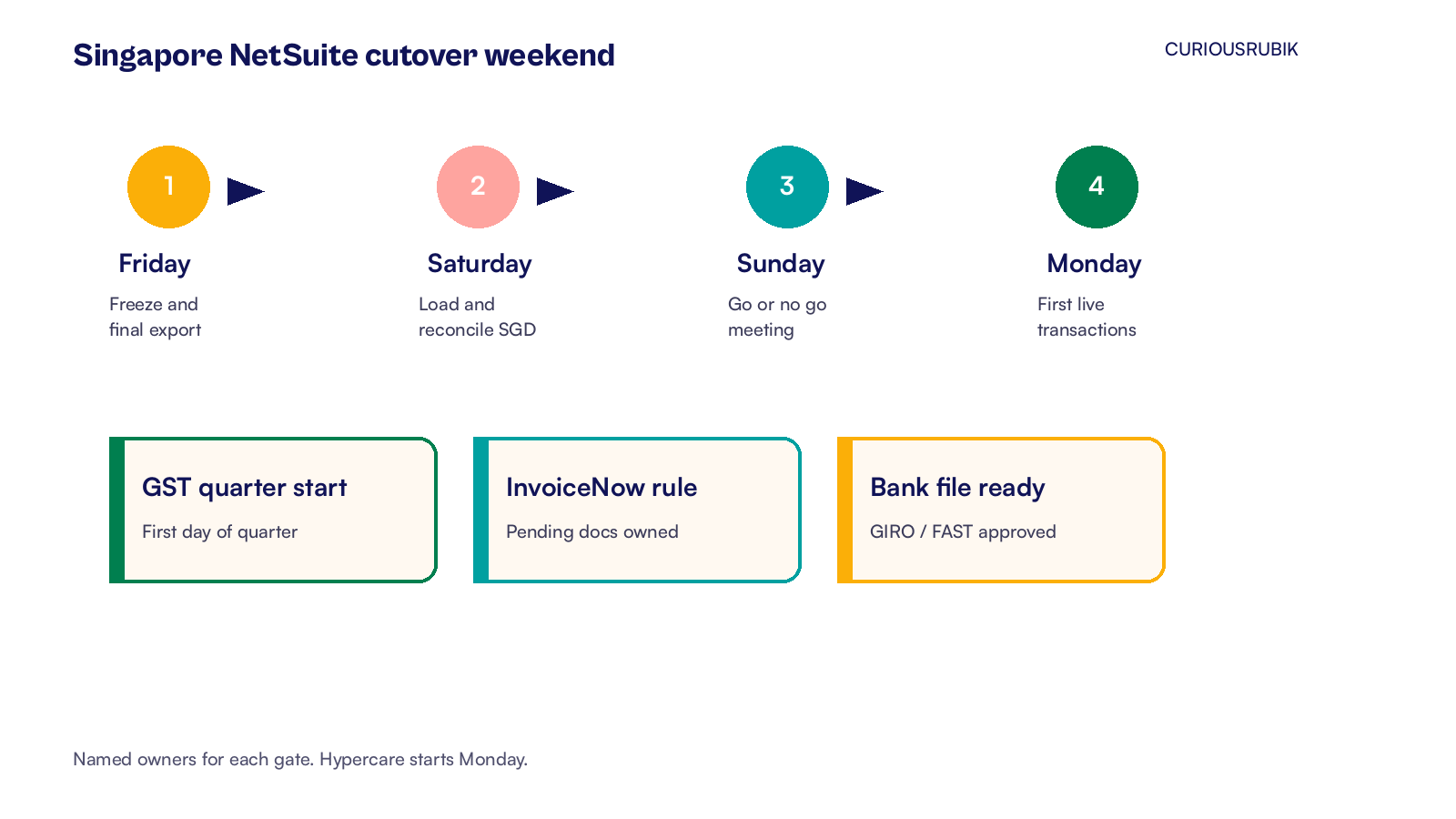
Friday to Monday: the cutover steps
Times below are Singapore time for a company that closes the old system on Friday evening and opens NetSuite on Monday morning. Adjust the clock to your trading hours, but keep the order.
Friday
- Announce the freeze. No new master data changes in the old system after the freeze time.
- Complete the last transactions you still want in the old system. Finish picking, packing and invoicing that must post there.
- Export final open AR, open AP, stock on hand and the trial balance as at the freeze.
- Lock old system users except the cutover team.
- Begin the final data load into NetSuite in the agreed order: chart and segments already in place, then masters, open transactions, stock, then the opening journal.
Saturday
- Finish the load and reconcile every control account in SGD to the old system export.
- Spot check twenty customers, twenty vendors and twenty items for tax code, currency and UEN or other identifiers.
- Post a small set of test transactions in NetSuite: one GST invoice, one credit note, one bill, one payment file in test mode if your bank allows it.
- Confirm InvoiceNow test messages and the recovery path for a rejected document.
- Update the issue log. Anything that blocks Monday trading must be fixed or accepted in writing before Sunday night.
Sunday
- Rerun the reconciliations after overnight fixes.
- Disable old system interfaces that would create duplicate orders or stock moves.
- Enable NetSuite integrations that were held for cutover (web store, 3PL, payroll journal import).
- Hold the go or no go meeting with the named owner. Use a short written list: balances match, InvoiceNow rule in place, bank file ready, roles ready, hypercare roster confirmed.
- If the answer is go, leave NetSuite open for the Monday team and keep the old system read only.
- If the answer is no go, keep the old system live. Leave NetSuite locked for trading users. Schedule the next weekend only after the failed gate is fixed and retested.
Monday morning
- Finance and warehouse leads sign the first live transactions together.
- Watch the first InvoiceNow submissions and the first payment file preparation.
- Run the saved searches you prepared for open orders, failed integrations and GST exceptions.
- Start the hypercare stand up cadence (daily for the first week is common).
What does Ruchitha watch for on a NetSuite go live in Singapore?
I have seen Singapore go lives stumble on the same three points. First, the GST quarter date was treated as a nice to have, then the first F5 became a forensic project. Second, InvoiceNow pending documents had no owner, so credit notes were raised in the wrong system. Third, the bank file was tested too late, and supplier payments slipped in week one.
My view is simple. Protect the weekend by finishing the local gates two weeks early. The software switch is then a controlled checklist, not a surprise.
If any gate is still open on the Thursday before cutover, move the date. A clean quarter start beats an ambitious Monday.
At CuriousRubik, we plan NetSuite cutovers with Singapore finance and operations in the room. Our NetSuite implementation team can build your weekend run sheet, run the dry runs with you and stay through hypercare. See how we support NetSuite customers in Singapore.
Related reading
NetSuite Implementation Timeline in Singapore by Stage
The multi month stages that should be finished before the cutover weekend.
NetSuite Data Migration in Singapore, Step by Step
Load order, SGD reconciliation and GST treatment on open items.
NetSuite GST F5 Return: How to Prepare and Review
How to agree each F5 box to tax codes and the ledger after go live.