For Singapore finance and IT leads who want a clear picture of their NetSuite account before they plan any fixes.
Last reviewed: 23 November 2026. Product details reflect this review date. Availability and behavior can vary by account, role and release.
A NetSuite health check in Singapore is a review of how your account runs, using records from a recent period. It covers goods and services tax (GST), InvoiceNow, Singapore dollar banking, user access, scripts and open items. Start with one subsidiary and use what you find to decide what to fix first.
What does a NetSuite health check in Singapore cover?
A health check is a planned look at your live account with a list of findings at the end. Each finding has a piece of evidence, an owner and a next step. Use those findings to keep the account working as your business changes.
Singapore adds its own checks to the usual ones. Your tax codes must match the GST rules, your invoices may need to travel over InvoiceNow, and your bank files follow local formats. Review access, scripts and open balances in the same pass.
What do you need before you start?
Set the scope first. Pick the last closed GST period and one subsidiary if you run NetSuite OneWorld. Name one person to write down findings. Save screenshots or saved search results as you go, so every finding has proof.
Ten checks to run on your account
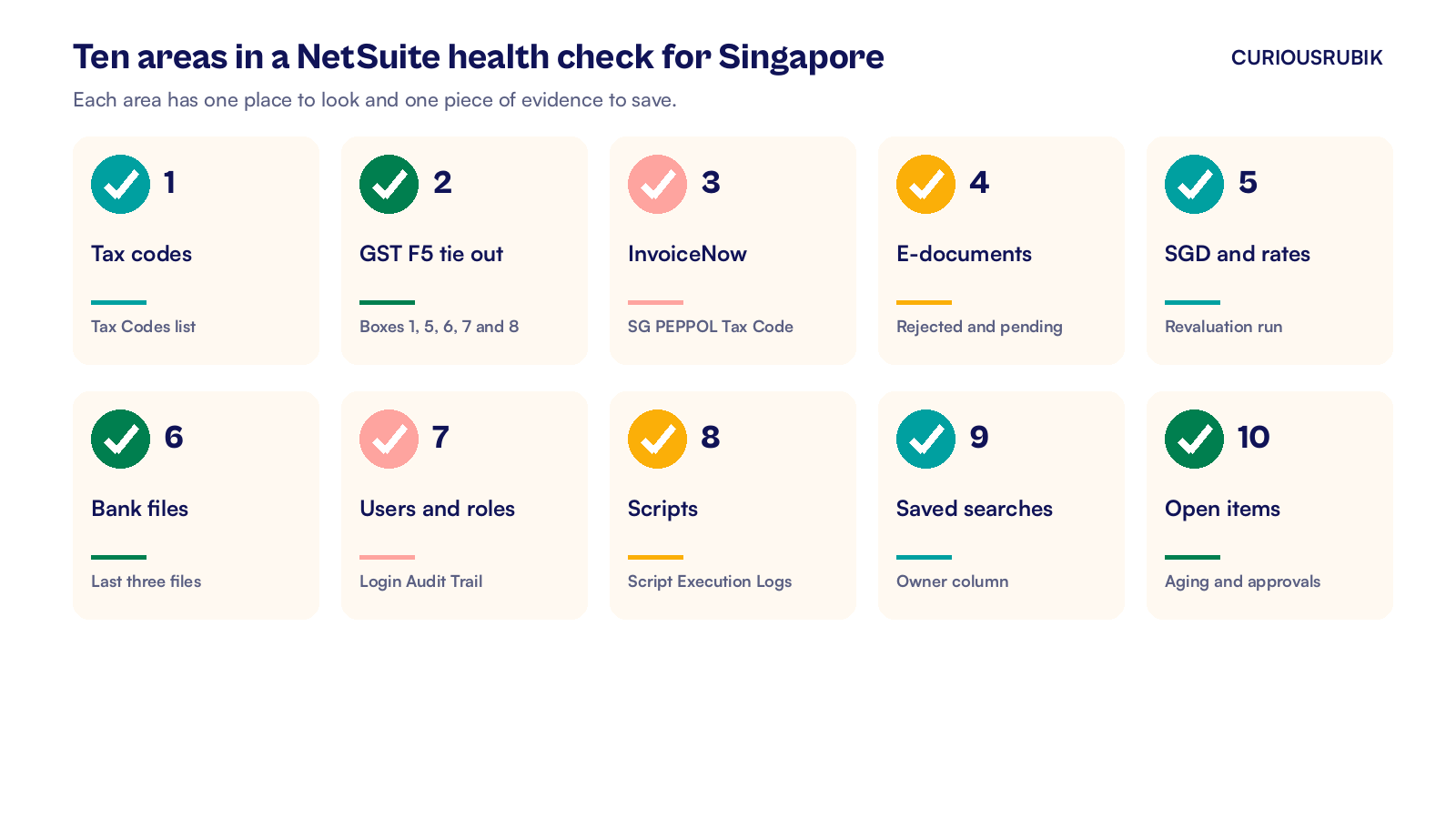
- Tax codes match the rules. Open Setup > Accounting > Taxes > Tax Codes. If you use the Singapore Localization SuiteApp, look for SG_BL, a 9 percent code for purchases where you incur GST and cannot claim it. Confirm the standard GST rate is 9 percent. Ask your tax adviser to confirm unclear cases. Flag unused or duplicate codes for review. Singapore Localization needs SuiteTax and the Tax Reporting Framework SuiteApp.
- The GST F5 ties to the ledger. Reconcile standard rated supplies in Box 1 and taxable purchases in Box 5 to your transaction detail. Check output tax in Box 6 and claimable input tax in Box 7 against your tax records. Box 8 is Box 6 minus Box 7. Filing and payment are due one month after the accounting period ends. Our guide to the NetSuite GST F5 return shows where each box comes from.
- InvoiceNow is ready for your date. For businesses in scope, the rule applies to new voluntary GST applications from April 1, 2026. For existing registrants in scope, phases begin April 1, 2028 and run through April 1, 2031. The first phase for existing registrants generally covers annual supplies of up to S$200,000. The Inland Revenue Authority of Singapore (IRAS) uses supplies from GST periods ending in 2025 to set the phase. Check the date in your IRAS notice. If you use the Singapore PEPPOL-Ready e-Invoicing SuiteApp, check the SG PEPPOL Tax Code field on the tax code records used by invoices and credit memos. Find those records at Setup > Accounting > Taxes > Tax Codes. An unmapped tax code can cause invoice or credit memo processing errors.
- Document status is clear. Look for invoices that were rejected, are still pending or were never sent. Read the status details before you decide whether to correct a record or follow up on delivery.
- Currency setup matches the ledger. Confirm the subsidiary’s base currency and check the exchange rates used at close. Give the last revaluation a reviewer and record the date for the next run.
- Bank files and reconciliation are current. If you send bank payment files, check the last three against the bank’s acknowledgments. Then check the oldest unreconciled item in each bank account. Use 60 days as a starting threshold for assigning older items to an owner. Our Singapore bank reconciliation guide shows how to review statement lines against the ledger.
- Users and roles match the team today. At Setup > Users/Roles > View Login Audit Trail, pull 90 days of successful logins. Compare them with the active user list to find accounts to review. Then list everyone holding the Administrator role and ask whether each person needs it. Our access review guide has the full routine.
- Script errors have owners. At Customization > Scripting > Script Execution Logs, filter up to 30 days of log entries by error level. Go to Customization > Scripting > Script Deployments and flag scripts with no clear owner or purpose.
- Reports have owners. Open Reports > Saved Searches > All Saved Searches and review the owners of searches that finance still uses. Assign a new owner when someone has left. If you sell subscriptions, our explainer on NetSuite Subscription Metrics shows the dashboards worth owning.
- Open items are aging in plain sight. Check unapplied customer payments and unused vendor credits. If you route bills for approval, look for any that are still waiting. Name who will test those workflows in Release Preview before each of Oracle’s two NetSuite releases a year.
Keep the findings short. A good row says what you saw, where you saw it and who should look at it next.
Ask two people to join for an hour each. The finance controller can confirm the tax and bank findings, and the system administrator can confirm users, scripts and releases. Two sets of eyes catch things one person reads past, and each owner then hears the finding first hand.
What do the findings mean and what comes first?
Use the table to pick a first action. Rank findings by filing dates, the amounts at stake and how much daily work is affected. Then give the top three an owner and a due date from the close calendar and GST deadline.
| What you found | What to check | What to do first |
|---|---|---|
| F5 box does not tie to the ledger | Whether the tax code and transaction appear in the right box | Trace one transaction from the return back to its code |
| Rejected or pending InvoiceNow documents | The status message and tax code mapping | Confirm delivery status before resending |
| Many unused users or extra Administrators | Which roles staff still need | Agree changes with managers before removing access |
| Script errors every day | Which script and deployment appear in the log | Name an owner and review the failing script |
| Old unreconciled bank items | A matching rule or timing issue | Trace the oldest items to statement entries |
CuriousRubik's NetSuite optimization team can run this review with you, rank the findings and agree on the first fix with your finance and IT leads. See how we support NetSuite customers in Singapore.
Related reading
NetSuite GST F5 Return: Preparation and Review
How the F5 boxes fill from NetSuite tax codes and what to check before you file.
NetSuite Roles and Permissions with an Access Review That Protects Daily Work
How to review who can do what without breaking anyone's daily work.
NetSuite Health Check in Australia: What It Covers
The same idea for Australian accounts, with BAS and payroll checks.