For Singapore finance leads who want every monthly pay run to reach NetSuite as one clean journal with CPF and SDL.
Last reviewed: 10 November 2026. Product details reflect this review date. Availability and behavior can vary by account, role and release.
NetSuite payroll integration in Singapore means your payroll solution calculates salaries, CPF and SDL, then sends one summary journal per pay run into NetSuite. NetSuite records the cost by department, holds the CPF, SDL and net pay liabilities and clears them when the payments go out. Payroll keeps the employee detail. NetSuite keeps the ledger.
What is a NetSuite payroll integration in Singapore?
A payroll integration is the agreed route by which pay run results move from your payroll solution into the NetSuite general ledger. Singapore companies on NetSuite run payroll in a dedicated payroll solution. Some solutions run inside NetSuite as a SuiteApp. Others sit outside and connect through a prebuilt connector or a journal import.
Either way, the split of work is the same, and it matches the design in our guide to NetSuite payroll integration in Australia. Payroll owns the people data and the statutory calculations. NetSuite owns the accounting, the approvals and the cash.
| Item | Owner | What NetSuite sees |
|---|---|---|
| Salaries, allowances, overtime and bonuses per employee | Payroll | Totals by account and department |
| CPF contributions, employer and employee shares | Payroll | One CPF payable line and one employer CPF expense line |
| Skills Development Levy (SDL) | Payroll | One SDL payable line and one SDL expense line |
| Department and cost center for each employee | Payroll, using NetSuite's list | The department on each expense line |
| Salary and CPF payments | Finance | Bank payments that clear the payables |
| IR8A and Auto Inclusion Scheme filing | Payroll | Annual totals that should tie to the ledger |
This split keeps salary detail private. Finance users see what the business spent by department. Only the payroll team sees what each person earned.
Which accounts and fields does the payroll journal need?
Set up the accounts before the first pay run, so the integration has somewhere to post. A typical Singapore payroll journal uses six lines.
- Salaries and wages expense. Gross pay, split by department.
- Employer CPF expense. The employer share of CPF, split by department.
- SDL expense. The levy, split by department.
- Net salaries payable. What you owe employees after their CPF deductions.
- CPF payable. Employer and employee CPF together, because you pay both to the CPF Board in one payment.
- SDL payable. The CPF Board collects SDL together with your CPF payment, so it clears in the same payment. Only employers with no local employees pay SDL directly to the Skills and Workforce Development Agency (SWDA).
Some companies need more lines. Self help group fund deductions are also paid through the CPF Board. Work permit and S Pass holders bring a foreign worker levy, which you pay separately and can post to its own payable.
Map each pay item to one account
Agree a mapping table with payroll before the first run. Each pay item in payroll points to exactly one NetSuite account.
| Pay item in payroll | NetSuite account |
|---|---|
| Basic salary, overtime and fixed allowances | Salaries and wages expense |
| Bonus and other additional wages | Accrued bonus, if you accrue monthly |
| Employer CPF | Employer CPF expense |
| Employee CPF and self help group funds | CPF payable |
| SDL | SDL expense and SDL payable |
| Foreign worker levy | Foreign worker levy expense and its payable |
| Expense claims paid through payroll | Employee claims clearing |
Bonuses need one extra thought. CPF treats a bonus as additional wages, which have their own yearly ceiling of S$102,000 less the ordinary wages already subject to CPF that year. Payroll applies that ceiling.
On the ledger side, accrue the bonus in NetSuite each month, then let the payroll journal clear the accrual when the bonus is paid. Your monthly cost then stays smooth, and the payout month does not carry a full year of bonus.
On the journal itself, fill in a few fields every time. Use the pay period end date as the date and set the subsidiary if you run NetSuite OneWorld. Put the department on each expense line and the pay run ID in the memo or a custom field.
If you want a second pair of eyes before posting, NetSuite can require journal approval. The preference sits at Setup > Accounting > Accounting Preferences, under Require Approvals on Journal Entries. The integration then posts the journal as pending approval, and the finance lead approves it.
A hypothetical October 2026 payroll for a Singapore distributor
A hypothetical Singapore distributor has 20 employees. All are Singapore citizens or permanent residents from their third year, all are aged 55 or below and each earns S$5,000 a month in ordinary wages. To keep the numbers simple, there are no bonuses and no self help group deductions this month.
Step 1. Payroll calculates CPF and SDL
From 1 January 2026, the CPF rate for employees aged 55 and below is 37 percent of ordinary wages up to the S$8,000 monthly ceiling. The employer pays 17 percent and the employee pays 20 percent.
For each employee earning S$5,000, total CPF is S$1,850. The employee share is S$1,000 and the employer share is S$850.
SDL is 0.25 percent of monthly wages, with a minimum of S$2 and a maximum of S$11.25 per employee. Each employee earns more than S$4,500, so each attracts the maximum of S$11.25.
The CPF Board rounds CPF and SDL in set ways. Total CPF is rounded to the nearest dollar, and the employee share is rounded down. Total SDL for the month is rounded down to the nearest dollar.
Let the payroll solution do this and post its figures. Do not recalculate them in NetSuite.
Step 2. Payroll groups the cost by department
| Department | Staff | Gross pay (S$) | Employer CPF (S$) | SDL (S$) | Total cost (S$) |
|---|---|---|---|---|---|
| Sales | 8 | 40,000 | 6,800 | 90.00 | 46,890.00 |
| Operations | 7 | 35,000 | 5,950 | 78.75 | 41,028.75 |
| Finance and admin | 5 | 25,000 | 4,250 | 56.25 | 29,306.25 |
| Total | 20 | 100,000 | 17,000 | 225.00 | 117,225.00 |
Step 3. Payroll posts one journal
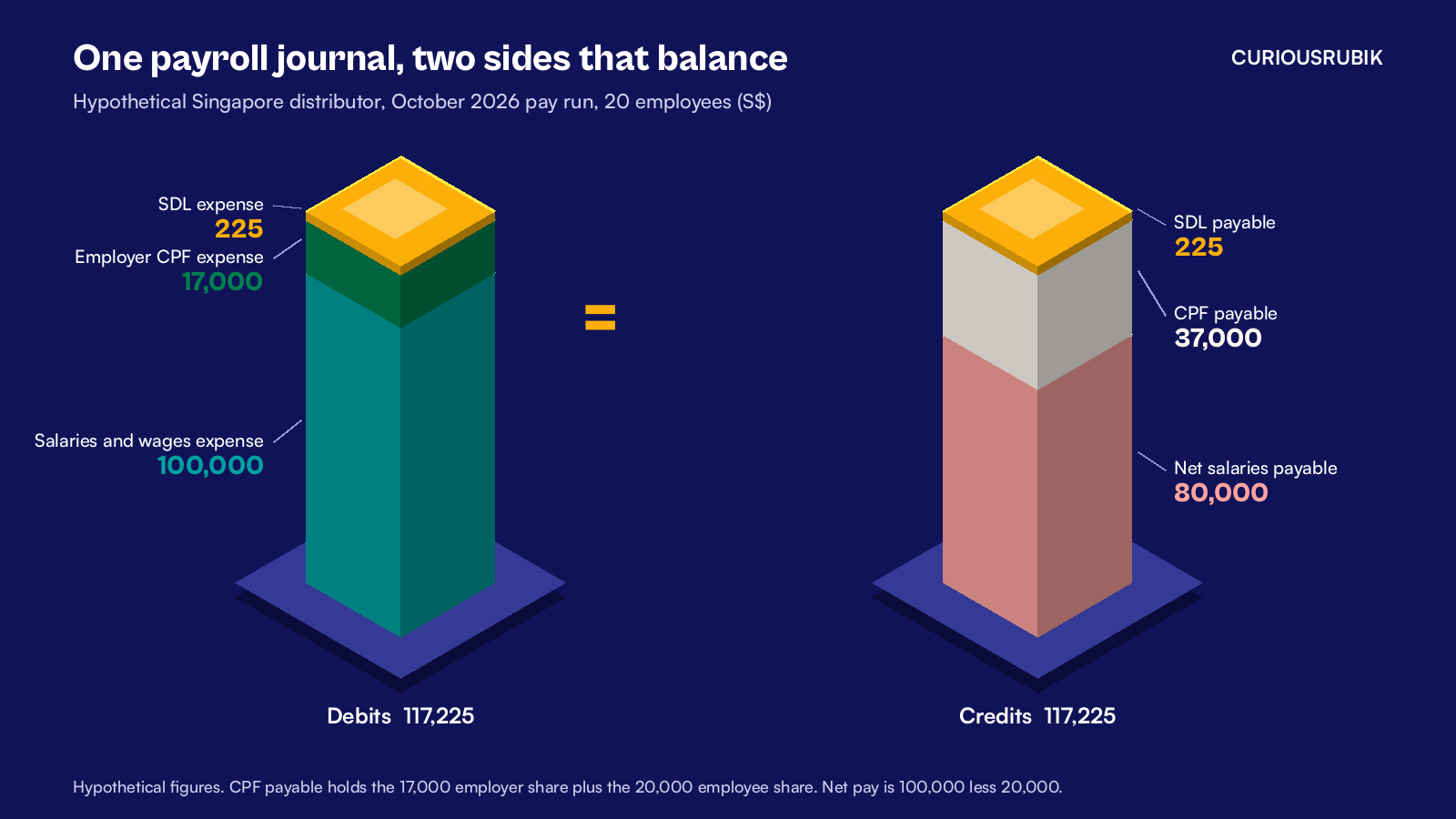
The integration posts one journal dated 31 October 2026, with the pay run ID OCT26 in the memo.
| Account | Debit (S$) | Credit (S$) |
|---|---|---|
| Salaries and wages expense, by department | 100,000 | |
| Employer CPF expense, by department | 17,000 | |
| SDL expense, by department | 225 | |
| Net salaries payable | 80,000 | |
| CPF payable (17,000 employer plus 20,000 employee) | 37,000 | |
| SDL payable | 225 | |
| Total | 117,225 | 117,225 |
The journal balances. Net pay is S$100,000 less the S$20,000 employee CPF, which gives S$80,000.
Step 4. Finance pays salaries and CPF
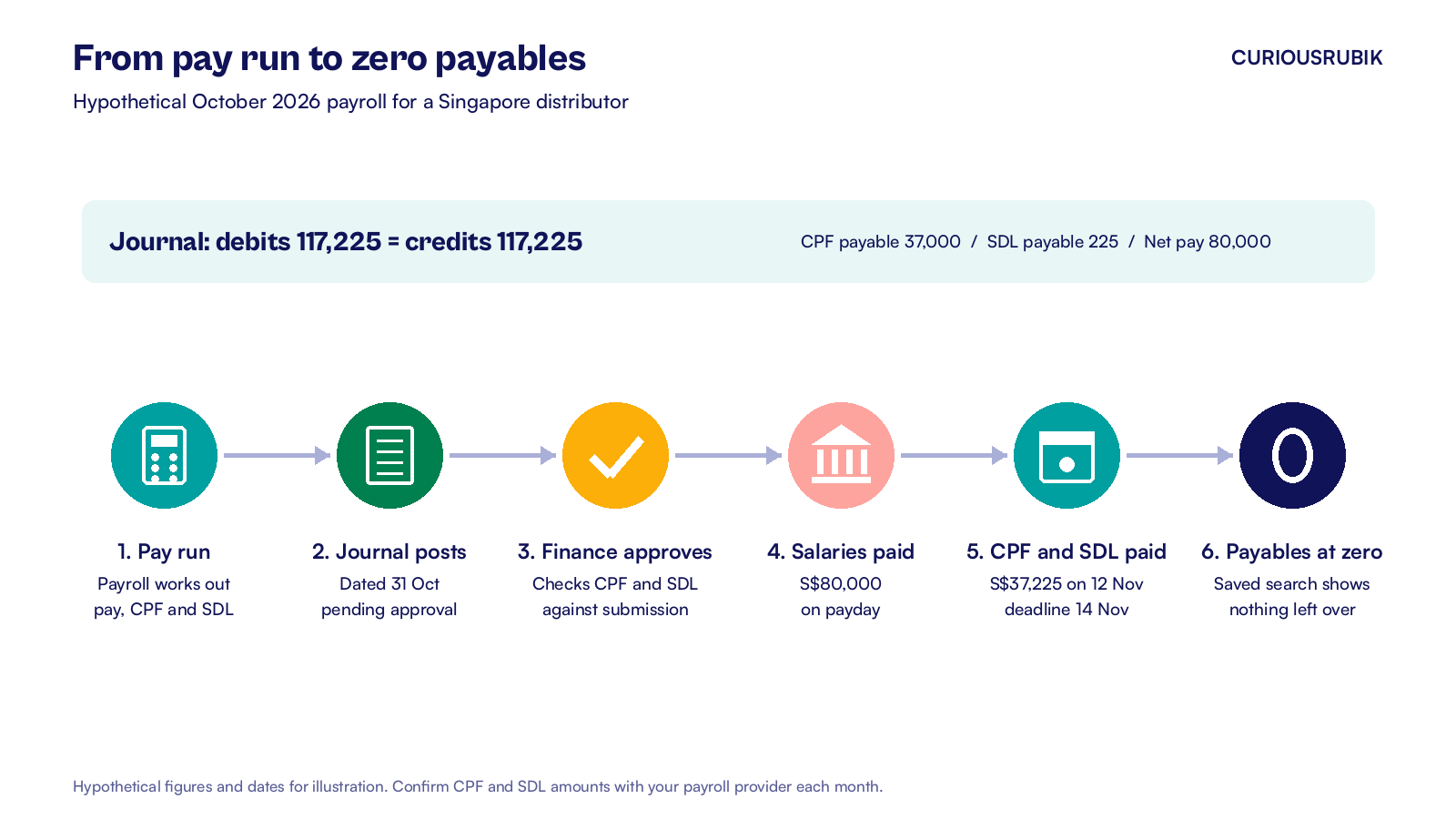
On payday, the salary payment of S$80,000 goes out through your bank file. The payment debits net salaries payable and credits the bank account.
CPF for October must be paid by 14 November at the latest. Finance pays CPF and SDL together on Thursday 12 November: S$37,000 of CPF plus S$225 of SDL, which is S$37,225. That payment debits both payables and credits the bank.
After both payments, net salaries payable, CPF payable and SDL payable for October are all zero. That zero is the simplest health check you have.
How should the journal reach NetSuite?
There are two common routes, and both work well when they are set up with care.
A connector or SuiteApp
The payroll solution posts the journal straight into NetSuite after each pay run. Give it its own integration role with only the permissions it needs, such as Make Journal Entry, plus access to accounts, departments and subsidiaries. Use token based authentication, so no person's password sits in the payroll system.
A CSV journal import
Payroll exports a journal file, and finance loads it at Setup > Import/Export > Import CSV Records, choosing Journal Entry. Save the field mapping, so every month uses the same columns. Put the pay run ID in the External ID column. If someone loads the same file twice, NetSuite rejects the duplicate.
Before go live, test the route in your sandbox account. Push three past pay runs through it and compare each journal with the payroll register for the same month. Check the totals, the department split and the memo. Fix the mapping until all three agree to the cent.
Whichever route you pick, map payroll departments to NetSuite departments by internal ID, not by name. A department renamed in NetSuite then keeps working in payroll.
How do you reconcile CPF and SDL each month?
Reconcile before you pay, and again after. Our guide to reconciling Singapore payroll to CPF evidence covers the first check in detail.
- Compare the CPF payable credit on the journal with the CPF submission total from payroll.
- Compare the SDL payable credit with the SDL on the same submission.
- After payment, run a saved search on the CPF payable and SDL payable accounts for the month. Both should show zero.
- Match the CPF payment on the bank statement during your monthly bank reconciliation in Singapore.
- Keep the CPF payment advice with the journal, as a file attached to the record.
Give each check an owner. The payroll lead runs the pay run and the CPF submission. The finance lead approves the journal and the payments. Your NetSuite administrator owns the integration role and the mapping table, so any change goes through one person.
A balance left on CPF payable at month end usually means one of three things. A late joiner was added after the journal posted. A correction was paid without a journal. Or the employee share was posted to the wrong account.
The saved search shows which month it came from, so you know where to look.
What about IR8A and year end?
Your payroll solution prepares IR8A forms for each employee. Employers in the Auto Inclusion Scheme submit employment income to IRAS by 1 March each year. NetSuite does not file these forms. It holds the numbers that should agree with them.
Before the payroll team submits, total the salaries and wages expense for the calendar year in NetSuite. Compare it with the year to date gross pay in payroll. Any gap should be explained by items you can name, such as a bonus accrued in December and paid in January.
Leavers need care too. Check whether a foreign or permanent resident employee needs tax clearance before they leave. Permanent residents staying in Singapore may qualify for an exemption. Where required, file Form IR21 at least one month before cessation and withhold all money due to the employee from when you learn of the departure.
Post that held amount to its own payable in NetSuite. It then does not sit inside net salaries payable and spoil your monthly zero check.
Moving to NetSuite in the middle of a year adds one step. Load the year to date payroll totals as part of your opening balances, so the year end tie out still works. The clearing account method in our NetSuite data migration guide for Australia works the same way for a Singapore cutover.
Which integration pattern fits your company?
The right setup depends on how many entities you run and how often you pay. Use this table as a starting point and confirm it with your payroll provider.
| Your situation | Pattern that fits | Why |
|---|---|---|
| One entity, one monthly pay run | CSV journal import with approval | Simple, cheap to run and easy to check each month |
| Several Singapore entities on NetSuite OneWorld | Connector posting one journal per subsidiary | Each entity's CPF stays in its own ledger and bank |
| Regional team across several countries | Connector with a mapping table per country | One method, with local accounts for each country's statutory items |
| Project or client billing that needs labor cost by job | Connector with department and project on each line | Cost lands on the project without exposing salaries |
| Payroll run inside NetSuite through a SuiteApp | Native posting from the SuiteApp | No file or connector to maintain |
At CuriousRubik, we design the accounts, mapping and checks that let payroll and finance work from the same numbers. Our NetSuite finance and payments integration team can set up your payroll journal route and the monthly CPF reconciliation. We support companies across Singapore on NetSuite.
Related reading
Reconcile Singapore Payroll to CPF Evidence Before Posting the NetSuite Journal
How to check the payroll register against CPF evidence before the journal posts.
NetSuite Bank Reconciliation in Singapore, Step by Step
How to match SGD and USD bank activity, including payroll and CPF payments, each month.
NetSuite Payroll Integration for Australian Businesses
The same integration design for an Australian payroll, with Single Touch Payroll and super.