
Useful NetSuite optimization for a Singapore company starts with the work your team does around the system. The settings come later. Find the tasks that take the most time or cause the most errors, such as the month-end close, GST reporting, InvoiceNow exceptions, intercompany and approvals. Rank fixes by the business value they return, clean up the scripts, workflows and searches that slow things down, and measure the result after each change.
Most accounts that need optimizing were configured well enough at go-live. Then the business changed. New subsidiaries, new products, staff turnover and quick fixes piled up, and the system drifted away from how people actually work.
Find friction from the people who use the system
Start with interviews and evidence before any configuration review. Spend an hour with each process owner: the financial controller, AR and AP leads, the warehouse lead and the regional finance contacts. Ask what takes longest, what they redo in Excel and what goes wrong at month-end.
Then look at the data. Saved searches exported to spreadsheets every week, journal entries that correct the same thing every month and support tickets on the same process all point to friction. Write each one down with an estimate of time lost or risk created.
Sit with people while they work, too. Watching an AP clerk enter a vendor bill, or a sales coordinator build a quote, shows extra clicks, workarounds and screens that nobody mentions in an interview because they have become normal. Note where users leave NetSuite to look something up, and where they keep their own lists. Those side spreadsheets usually mark a missing field, report or saved search.
Rank fixes by business value
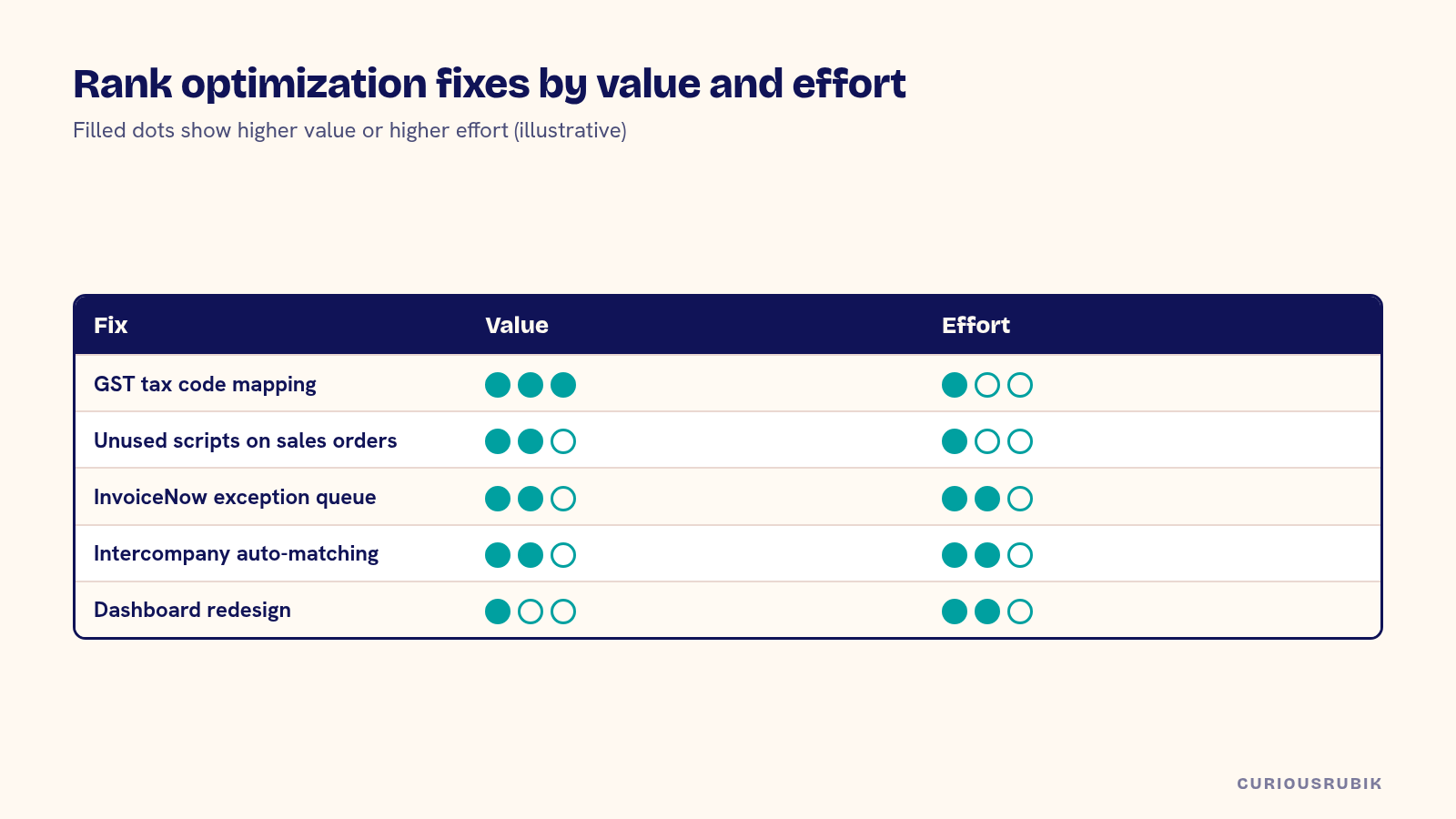
Not every problem is worth fixing now. For each item, estimate the time saved, the error risk reduced and the effort to fix. Put them on a simple grid. A two-day fix that removes a weekly half-day of rework comes first. A month-long redesign that saves an hour a quarter waits.
Agree the ranking with the finance lead and whoever funds the work. Our post on which NetSuite improvement a Singapore regional HQ should fund next has a method for that conversation.
Clean up scripts, workflows and searches
Accounts accumulate customizations. Some scripts run on every save of a transaction and slow down entry for everyone. Workflows overlap. Hundreds of saved searches exist, many owned by people who left.
List every script and workflow with its owner, purpose and last change. Retire what is unused, after checking dependencies. Review scripts that run on high-volume records for performance. For saved searches, assign owners and archive the rest. Our guide to NetSuite saved search governance and ownership explains how to do it safely.
Fix the Singapore-specific pain points
Singapore companies often find the same friction. GST reports need manual adjustments because tax codes were mapped inconsistently. Foreign-currency invoices show SGD amounts that don't match the GST report by a few cents. InvoiceNow exceptions are handled by email instead of a queue. Regional subsidiaries close on different calendars.
Each of these can be fixed with targeted changes. For InvoiceNow, the approach in NetSuite Peppol in Singapore: rejections and exceptions shows how to set up exception handling that scales.
Review roles, approvals and dashboards
Roles often grow too broad over time, because adding permissions is faster than designing a role. Review who can do what, especially for vendor bank details, journal approval and tax setup. Tighten roles where the risk is real.
Approval workflows often become bottlenecks. Check how long approvals take, who is a frequent blocker and whether thresholds still make sense. Dashboards should show what each role needs to act on today. Replace dashboards nobody looks at.
Training belongs here as well. Some friction is a knowledge gap: a feature that exists but nobody was shown, or a process that changed after the original trainer left. Short, role-based sessions on the fixes you make, with a one-page guide for each, help the changes stick. Without them, people drift back to the old workaround within a month.
A hypothetical Singapore optimization review
A hypothetical Singapore regional distributor with four subsidiaries has used NetSuite for five years. A two-week review produces this ranked list. All figures are illustrative.
| Fix | Time saved or risk reduced | Effort | Priority |
|---|---|---|---|
| Correct GST tax code mapping on 38 items | Removes 4 hours of manual GST adjustments per quarter and a filing risk | 2 days | 1 |
| Retire 3 unused scripts on sales orders | Sales order save time drops noticeably | 1 day | 2 |
| InvoiceNow exception queue | 3 hours a week of email handling | 4 days | 3 |
| Intercompany auto-matching | Half a day of month-end matching | 6 days | 4 |
| Redesign dashboards for 5 roles | Faster daily review | 3 days | 5 |
The company funds the first three immediately and schedules the others for the next quarter. After a month, it checks the GST adjustments and the InvoiceNow time to confirm the savings. Your list will differ. The ranking method carries over.
Measure the result after each change
Optimization should show results. Before each fix, record a baseline: hours spent, errors per month, close days or ticket count. After the fix, measure the same thing. If the result is smaller than expected, find out why before moving to the next item.
Keep the measures simple and owned by the business. A controller who tracks close days, or an AR lead who counts InvoiceNow exceptions each week, gives more reliable evidence than a one-off report built by the consultant.
Keep the evidence. It helps fund the next round and shows support partners where repeat issues have stopped. Our guide to a NetSuite health check that prioritizes evidence and business impact covers how to keep that evidence useful.
Decide when optimization becomes a rescue
Sometimes the problems are too deep for targeted fixes: core design choices that don't fit the business, data that can't be trusted or an implementation that never finished. In that case, read NetSuite implementation rescue in Singapore. If your problems are mainly with response and coverage, compare options with our guide to NetSuite support in Singapore.
Use the NetSuite optimization checklist
Before you start, check each of these:
- Have you interviewed each process owner about friction?
- Is each problem written down with time lost or risk created?
- Are fixes ranked by value and effort, and agreed with the funder?
- Is every script and workflow listed with an owner and purpose?
- Do saved searches have owners, with unused ones archived?
- Are GST, foreign-currency and InvoiceNow pain points on the list?
- Are roles and approval thresholds reviewed?
- Is a baseline recorded before each fix and measured after?
Our NetSuite optimization work starts with a ranked list of fixes and agreed measures, and our page for Singapore-led NetSuite programs describes how we work with regional teams.
Related reading: A NetSuite Health Check That Prioritizes Evidence and Business Impact
Frequently asked questions
What is NetSuite optimization?
It is targeted work to remove friction, errors and slow processes from an existing NetSuite account, ranked by business value.
How long does an optimization review take?
It depends on account size and the number of processes. A focused review of key processes often takes a few weeks.
Should we retire old scripts?
Retire unused scripts after checking dependencies. Review high-volume scripts for performance.
How do we measure the results?
Record a baseline before each fix, such as hours, errors or close days, and measure the same thing afterward.
When is optimization not enough?
When core design, data or the implementation itself is the problem. Then a structured rescue may be needed.