For Australian warehouse and finance leads: one distributor's move from paper pick lists to NetSuite scanning, with setup steps and costs.
Last reviewed: 24 October 2026. Product details reflect this review date. Availability and behavior can vary by account, role and release.
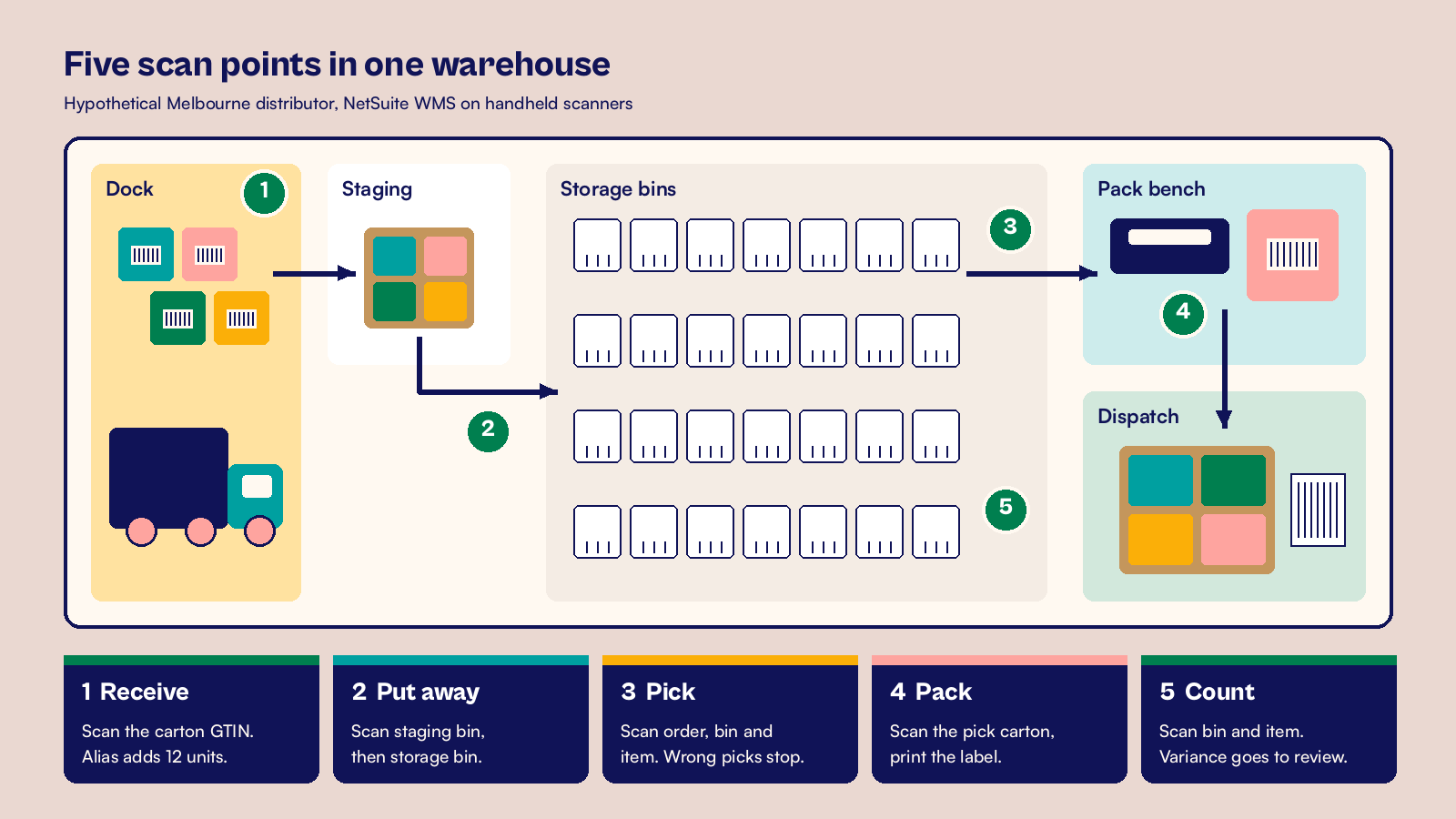
NetSuite barcode scanning in Australia works best with NetSuite WMS and a handheld scanner at five points: receive, put away, pick, pack and count. Map each supplier's GS1 carton code to the item once. After that, every scan updates stock straight away. A hypothetical Melbourne distributor recovers its one off setup cost in about 15 months.
Key takeaways
- Pick your setup first. Bar Coding and Item Labels prints and reads item codes. NetSuite WMS adds guided scanning on the warehouse floor.
- Many Australian suppliers already print GS1 codes on cartons and pallets, especially those that sell to large retailers. NetSuite can read them, so you may need to relabel very little stock.
- One Item Alias per carton code lets a single scan receive a full carton of 12.
- Scanning makes your 30 June stocktake shorter, because cycle counts keep bins right all year.
What does NetSuite barcode scanning in Australia involve?
Barcode scanning is the use of a handheld device to read a code on an item, bin, carton or order. NetSuite records the movement without anyone typing it. The scan fills the item, quantity, lot and expiry on the screen, and NetSuite posts the receipt, transfer or fulfillment in real time.
NetSuite gives you two ways to do this. They suit different warehouses, and many companies start with one and add the other later.
| Need | Bar Coding and Item Labels | NetSuite WMS |
|---|---|---|
| Print item labels from NetSuite | Yes | Yes |
| Read a code into an item field on a record | Yes | Yes |
| Guided mobile screens for receive, put away, pick, pack and count | No | Yes |
| GS1 codes with lot, expiry and serial details | No | Yes |
| Best fit | Small stockrooms, counter sales, simple receiving | Warehouses with bins, waves and many daily orders |
Bar Coding and Item Labels is a feature you switch on in your account. NetSuite WMS is an add on module with its own mobile app, so it appears as a line in your NetSuite quote. Our example uses NetSuite WMS, because the distributor runs bins and ships to retailers every day.
A hypothetical Melbourne distributor before scanning
A hypothetical homewares distributor runs one warehouse in Melbourne's south east. It stocks 2,400 active items, employs 14 warehouse staff and ships about 4,000 orders a month to retailers and online customers. All amounts below are in AUD and exclude GST.
Before scanning, pickers work from printed pick lists. Receivers type quantities from supplier packing slips, which takes about two hours a day. Mispicks run at 1.2% of orders, or 48 a month. Each one costs about A$45 in return freight, a repick and a credit note.
The EOFY stocktake is the hardest week of the year. The warehouse closes for two eight hour days, and 10 staff count every bin on paper. That is 160 hours of counting before finance can value stock at 30 June.
The barcodes already on the dock
The team walked the dock before buying anything. Most supplier cartons already carried a GS1-128 code holding a 14 digit GTIN, the global trade item number that identifies a carton of a product. Pallets from the larger suppliers carried an SSCC, the serial shipping container code that identifies one pallet.
Single units carried the 13 digit code shoppers see at the checkout. Two retail customers also asked for SSCC labels on the pallets they receive. That told the team two things. They would scan existing codes, not print new ones, and their label design had to include outbound pallet labels.
How did the team set up scanning?
The team set up and tested everything in a sandbox account first, using real supplier labels. A good rule of thumb: if a carton label fails in the sandbox, it will fail on the dock on a Monday morning.
Setup before the first scan
- Turn on Bar Coding and Item Labels at Setup > Company > Enable Features > Items & Inventory.
- Enter the 13 digit unit code in the UPC Code field on each item record. Items with no code print their item number as a Code 128 label.
- Activate the Enable Advanced Barcode Scanning? system rule for the warehouse location and set the process type to GS1. Each location takes one advanced format.
- Create an Item Alias for each carton GTIN at WMS Configuration > Configure Items > Item Aliases > New. Enter all 14 digits in the Name field, including the check digit. Then pick the item and a default unit from its unit type, such as Carton of 12.
- Turn on tally scanning for receiving, put away, picking and counts, so each scan adds one unit or carton.
- Print a Code 128 label for every storage bin and staging bin, and fix it where a picker can scan it from the aisle.
- Test with 20 real cartons from 10 suppliers, including lot and expiry items, before any user training.
For lot items, the GS1 code carries the lot in application identifier 10 and the expiry date in identifier 17. NetSuite reads both into the lot and expiry fields during the scan. Pickers can then take the earliest expiry first.
Devices and wireless coverage
NetSuite WMS runs on Android 7.0 or later and on supported iPhone and iPad models. Each device needs a 1D scanner, a touch screen of at least 4 inches, Bluetooth and a wireless network connection. GS1 codes contain a special separator character called FNC1, so choose a scanner that passes it through. Where staff scan into a browser, use Chrome.
The team bought 8 rugged Android scanners for 14 staff across two shifts. A wireless survey found two dead spots at the back of the high racking, so they added access points there before go live.
Roles and training
An administrator with the WMS Warehouse Manager role handles the setup screens. Floor staff get roles limited to the mobile processes they use, so a picker never opens the receiving screens by mistake.
Training happened on the floor, not in a meeting room. Each process got a 45 minute session with real cartons, and one super user per shift took the questions in the first week.
Step 1. Receive
Receivers open Receiving > Purchase Order and scan the PO number or a carton into the Scan/Enter PO # or Item field. NetSuite lists the open purchase orders for that item, and the receiver picks the right one. Each carton scan reads the alias and adds 12 units, with lot and expiry filled from the code. The receiver then posts the item receipt from the app.
Our post on NetSuite mobile receiving and barcode validation covers the tests to run on this screen.
Step 2. Put away
The receiver opens Receiving > Putaway, scans the staging bin or the item, then scans the storage bin on the Enter To Bin page. Stock moves from the dock to its shelf in one transfer. If your bins are not set up yet, start with our guide to the Bin Management feature in NetSuite.
Step 3. Pick
Pickers open Picking > Single Order Picking, scan the order number, then scan the bin and the item. NetSuite checks each scan against the pick task. A wrong item or wrong bin is stopped on the spot, before it reaches a carton. When the task is done, the picker taps Go to Staging and scans the outbound staging bin.
Step 4. Pack
With pick cartons turned on in the WMS system rules, pickers scan a carton label as they pick. At the pack bench, packers confirm each carton and print the shipping label from your shipping setup. NetSuite creates or updates the item fulfillment as orders are staged, based on your fulfillment preference.
Step 5. Count
Counters open Inventory > Cycle Count, scan the plan number, then scan each bin and item. NetSuite compares the count to the expected quantity, and a supervisor reviews any variance before the count posts. The team counts fast moving items every month and slow items every quarter.
Clean item data makes every one of these steps faster. The item and stock load order in our NetSuite data migration guide applies in any market, including the step where codes are added to each item.
What did the rollout cost and save?
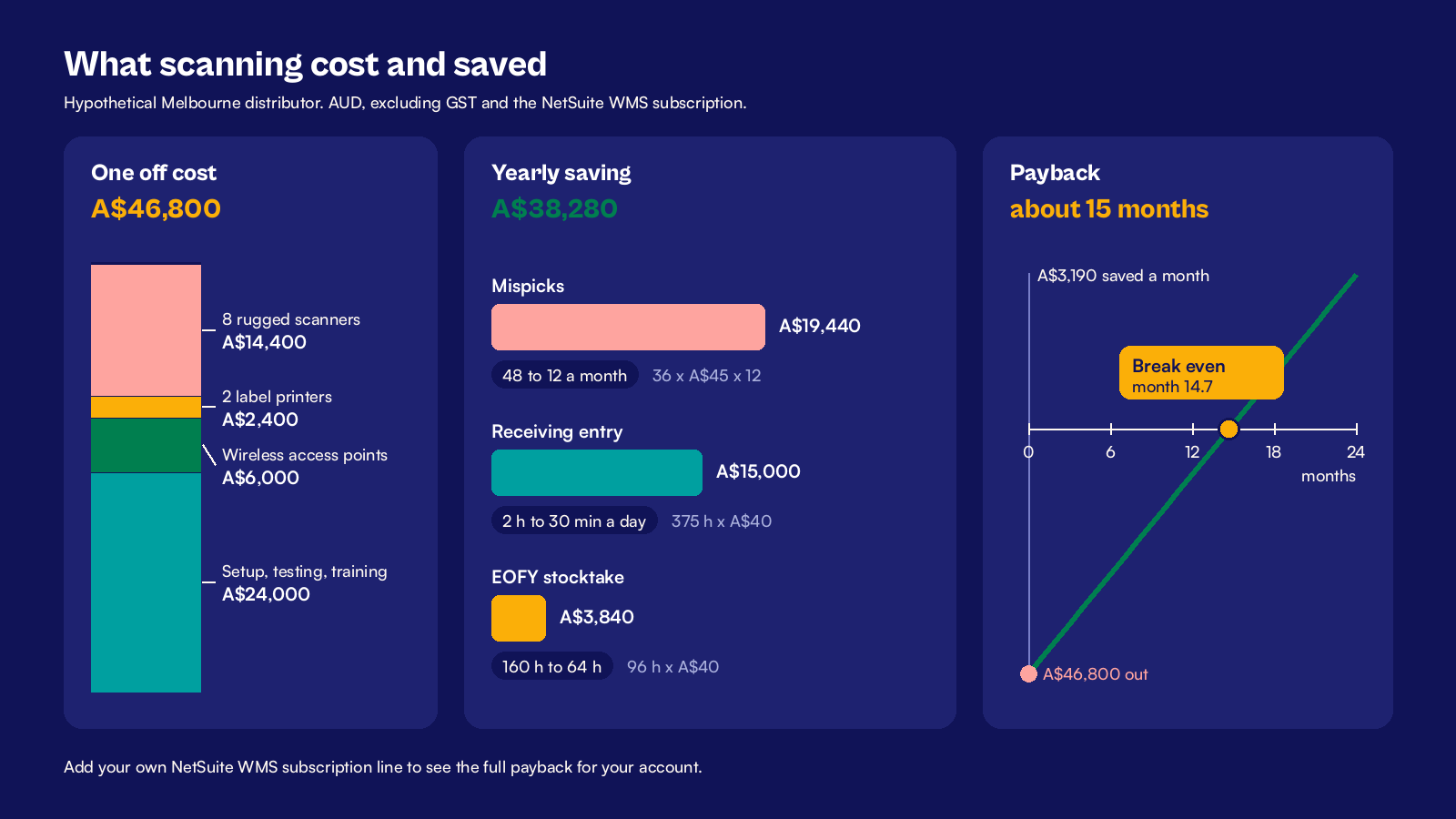
The rollout took 10 weeks from the dock walk to go live. These are the one off costs, excluding the NetSuite WMS subscription, which comes from your own NetSuite quote.
| One off cost | Amount |
|---|---|
| 8 rugged Android scanners at A$1,800 | A$14,400 |
| 2 label printers at A$1,200 | A$2,400 |
| Wireless access points for the back racking | A$6,000 |
| Partner setup, testing and training | A$24,000 |
| Total | A$46,800 |
Three months after go live, the team priced its yearly savings. It used a loaded labor cost of A$40 an hour.
- Mispicks fell from 48 to 12 a month. At A$45 each, that saves A$1,620 a month, or A$19,440 a year.
- Receiving entry fell from two hours a day to 30 minutes. Over 250 working days, that saves 375 hours, worth A$15,000.
- The EOFY stocktake is now planned for one day with 8 staff, down from two days with 10. That saves 96 hours, worth A$3,840.
The yearly saving is A$38,280, or about A$3,190 a month. The one off cost of A$46,800 is paid back in about 15 months. Add your WMS subscription to see the full payback for your account.
The first two weeks after go live
Three issues came up, and each one took less than a day to fix.
- Cartons with no GTIN. About one supplier in ten printed no carton code. Receivers printed a Code 128 item label from NetSuite at the dock and stuck it on.
- An alias with the wrong unit. One alias was saved with a unit of Each, so a carton scan added 1 instead of 12. The tally count on the receipt showed the gap the same morning.
- Scanners with FNC1 turned off. Two devices dropped the separator and could not read lot codes. A settings change on each device fixed them.
A 15 minute stand up at the start of each shift kept the list short. By week three, the super users had nothing new to report.
What changed for GST and EOFY
Correct receipts help your BAS. When the item receipt matches the vendor bill, the bill passes the three way match on time. The GST credits you claim at label 1B then reflect goods you actually received. Fewer bills sit on hold at quarter end.
The ATO expects you to value trading stock at the end of each income year, using cost, market selling value or replacement value for each item. A scanned count gives finance a dated, bin level record to support that value. Confirm the valuation method with your tax adviser. Our NetSuite EOFY checklist for Australian finance teams shows where the count fits in the June close.
At CuriousRubik, we plan scanning as a process change first and a device purchase second. CuriousRubik's NetSuite implementation team can design your scan points, set up NetSuite WMS and train your floor staff. Our NetSuite Australia page explains how we work with Australian businesses from the first workshop to go live.
What to check this week
You can test your readiness in an afternoon, before you talk to anyone about devices.
- Pull 20 cartons from 10 suppliers and scan them with any phone app. Note which ones carry a 14 digit GTIN, lot and expiry.
- Export your active items and mark the ones with no unit barcode on file. That count is your data cleanup list.
- Walk the racking with a phone and note any spot with weak wireless signal.
- Ask your top three retail customers what they require on pallet labels.
- Count last month's mispicks and credit notes, and price each one.
- Book the date of your next stocktake, and decide which bins a cycle count plan could cover first.
Related reading
NetSuite Wholesale Distribution in Australia
How Australian distributors run purchasing, stock and fulfillment in one NetSuite account.
NetSuite WMS Requirements from Receiving to Dispatch
The warehouse requirements to agree before you configure NetSuite WMS.
NetSuite Lot Expiry and FEFO Picking Requirements
How to set up lot tracking and pick the earliest expiry first.