NetSuite PDPA controls start with knowing where personal data sits in your account. Then you limit who can see it, who can export it and how long it stays. For a Singapore company that means field and role restrictions on customer, contact, vendor and employee records, a retention rule NetSuite can act on, and evidence you can produce when someone asks for their data or a breach is suspected.
The usual mistake is treating the Personal Data Protection Act as a policy that lives with legal or HR. When something goes wrong, the Personal Data Protection Commission (PDPC) looks at what the organization actually did. If 30 users can export every employee's bank account to a spreadsheet, a well-written policy does not change that.
Map where personal data sits in NetSuite
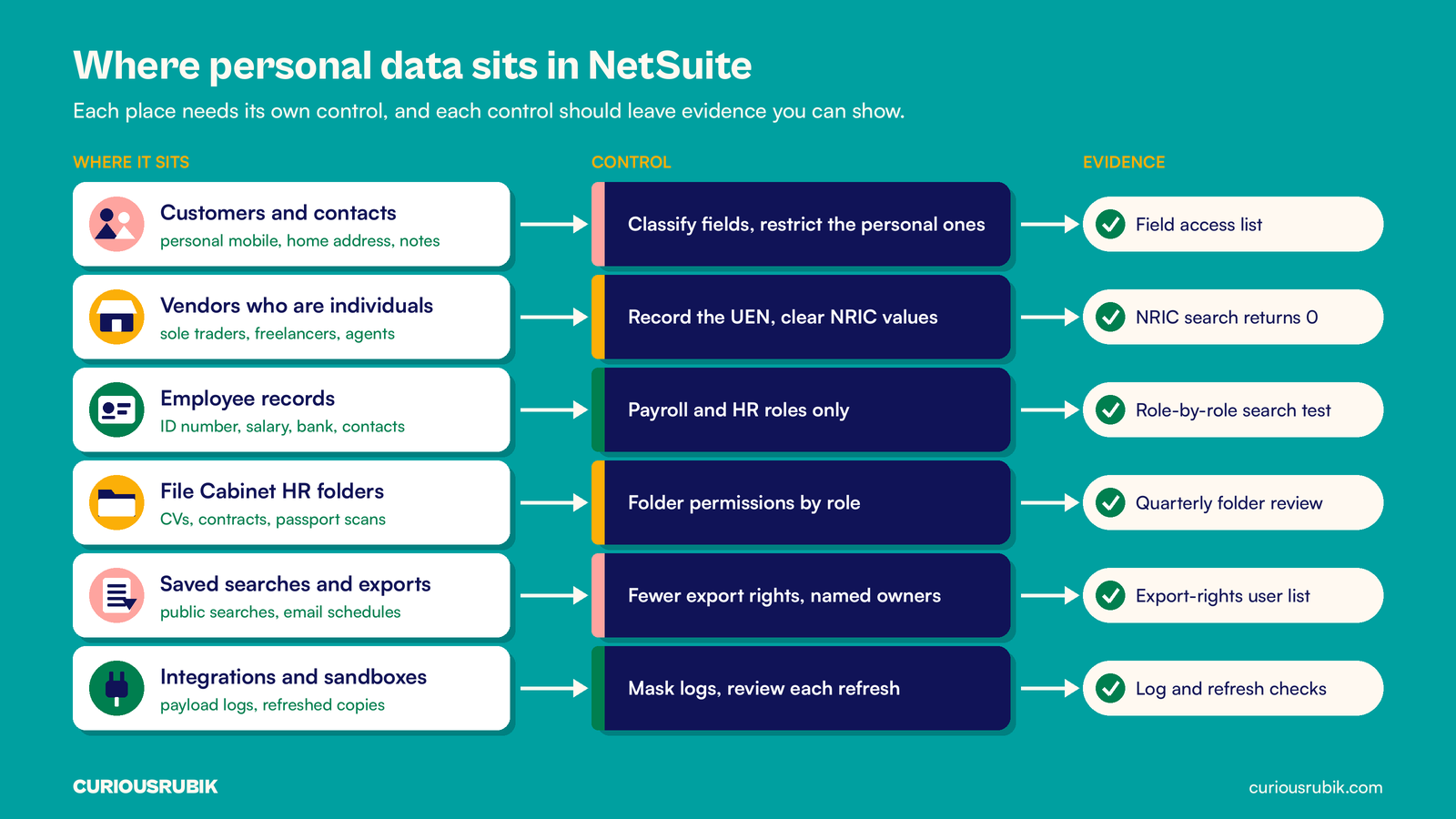
Personal data in a typical Singapore NetSuite account sits in more places than the employee record. Look at individual customers and sole proprietors, contacts at business customers, vendors who are individuals (freelancers, commission agents, sole traders), employee records, File Cabinet attachments such as CVs and signed contracts, and custom records added by SuiteApps.
Classify fields, not record types. Business contact information falls outside most PDPA obligations, but a contact record often holds more: a personal mobile number, a home delivery address, notes about a complaint. An employee record holds identification numbers, salary, bank details and emergency contacts, each with a different audience.
For every sensitive field, write down the purpose, the business owner, the roles that need to view or edit it and the event that ends its use. Then add the copies. Integration logs, scheduled search emails and sandbox refreshes all hold personal data too. Our guides to protecting sensitive data in NetSuite integration logs and sandbox data handling for external testers cover those two paths in detail.
Stop collecting NRIC numbers you do not need
The PDPC advisory guidelines on NRIC and other national identification numbers, in effect since 1 September 2019, mean an organization should generally not collect, use or disclose NRIC numbers or copies of the card unless the law requires it or it is necessary to verify someone's identity to a high degree of fidelity.
For employees, payroll, CPF and tax reporting usually give you a legal basis, so the number stays, but only payroll and HR should see it. The problem is usually elsewhere. An old migration may have added an "IC number" custom field to vendor records for sole proprietors, or a sales rep may have typed a customer's NRIC into a memo to "confirm identity".
Find them with saved searches: custom field labels containing NRIC, IC, FIN or passport, and a formula search on free-text fields for the NRIC pattern of one letter, seven digits and one letter. Where a vendor is a registered business, record its UEN instead. Where there is no legal need, clear the values and retire the field.
Restrict roles and fields, not just forms
Hiding a field on a custom form changes the layout, not access. A user who cannot see the bank account on a form may still add it to a saved search or a CSV export.
Set access on the role first: which roles can view employee records, and at what level. Then restrict sensitive custom fields by role, department or subsidiary so only payroll and HR can view identification and bank fields. Test each role by searching for the field, not just by opening the record. Our NetSuite roles and permissions access review guide gives a repeatable review method, and employee records and user access explains why giving someone a login is a separate decision from holding their HR data.
If staff in an overseas office use the same account, their access to Singapore personal data can count as a transfer, which needs comparable protection such as an intra-group agreement. If you run NetSuite intercompany for a Singapore regional HQ, check which subsidiaries' roles can see Singapore employee and customer fields.
Control exports, saved searches and scheduled emails
Exports are where personal data leaves NetSuite in bulk. Review which roles can export lists and search results, and keep that right to people whose work needs it. A controller exporting aged debtors is normal. A warehouse role exporting the full contact list is not.
Then list every saved search that returns personal fields and is public or emailed on a schedule. A monthly search sending staff birthdays and mobile numbers to a shared mailbox is a disclosure. Do the same for File Cabinet folders that hold HR documents, using the approach in NetSuite File Cabinet permissions.
NetSuite records logins in the Login Audit Trail and field changes in System Notes. Confirm what your account records about exports before relying on it. The stronger control is fewer people with export rights.
Set retention rules NetSuite can act on
The PDPA expects you to stop retaining personal data, or remove the means of linking it to a person, once the purpose is no longer served and there is no legal or business reason to keep it. Tax and accounting records generally have to be kept for five years under IRAS rules, so the invoices stay. The personal detail around them often does not need to. Our post on separate retention clocks for tax, payroll and personal data explains how to set each trigger.
NetSuite usually will not delete a customer, vendor or employee with transactions. Make the record inactive, then remove the personal field values that no longer have a purpose. NetSuite provides a personal information removal function, with a matching SuiteScript module, that can remove values from selected fields and their System Notes history. Check that it is enabled in your account and which roles hold it, and test it in a sandbox first, because the removal cannot be undone.
Write the rule as a saved search, for example former employees past your retention period who still have bank, address or identification values. The search is the monthly worklist, and the removal log is the evidence.
Answer access and correction requests from one search
An individual can ask what personal data you hold about them and how it has been used or disclosed in the year before the request. You should respond as soon as reasonably possible. If you cannot respond within 30 days, you should tell the person in writing within that time when you will.
Use the inventory from the first step to build one saved search per record type, keyed on email address or name, so the data protection officer can compile a response in an hour. When a correction is made, the PDPA generally expects you to send the corrected data to organizations you disclosed it to in the past year, unless they no longer need it. In NetSuite terms that often means the payroll provider or a CRM connected through an integration, so note which integrations carry each field.
Prepare breach evidence before you need it
If a breach may have occurred, the PDPC expects you to assess it promptly, within 30 days. If it is notifiable, because it is likely to cause significant harm or affects 500 or more people, you must notify the PDPC within three calendar days of deciding that, and usually tell affected individuals too.
Three days is not long enough to learn how to read your own logs. Build the searches now: Login Audit Trail filtered by role, IP address and failed attempts; System Notes on sensitive fields; the list of users with export rights; and active integration tokens. Our NetSuite login audit trail review shows what normal looks like.
A hypothetical PDPA review of a NetSuite account
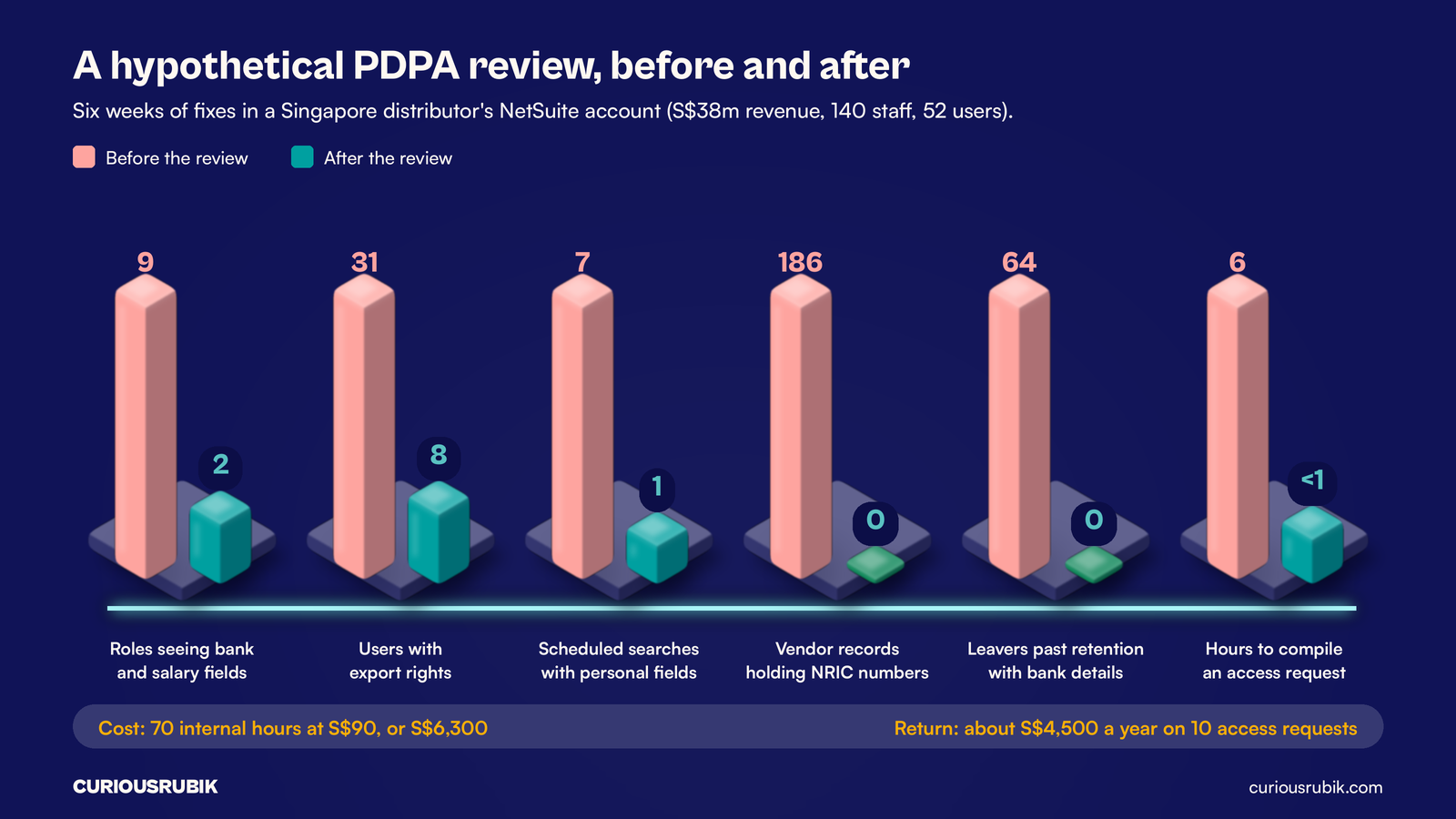
This example is hypothetical and simplified. A Singapore B2B distributor with S$38 million in revenue and 140 employees has run NetSuite for four years, with a Malaysian sales office in the same OneWorld account and 52 named users. The finance director orders a PDPA review after a customer list is forwarded to a personal email address.
The six-week review finds and fixes the following:
- Roles that can view employee bank and salary fields: 9 before, 2 after (payroll and HR manager).
- Users who can export lists and search results: 31 before, 8 after.
- Saved searches with personal fields on an email schedule: 7 before, 1 after, sent to the named payroll owner.
- Vendor records holding NRIC numbers in a custom field: 186 before, 0 after. UENs were recorded for 141 registered businesses, and the field was cleared for the other 45 after finance confirmed there was no legal need.
- Former employees past the retention rule with bank details still on file: 64 before, 0 after.
- Time to compile an access request: about six hours before, under one hour after.
The review takes 70 internal hours at a blended S$90 an hour, or S$6,300. The distributor receives about ten access or correction requests a year, so saving five hours on each is worth about S$4,500 a year. The bigger gain is harder to price: a compromised export-capable login is now one of 8, not one of 31, and the Malaysian team no longer sees Singapore payroll data.
Keep the evidence current
Controls drift. A new SuiteApp adds custom fields, a role gets copied for a new hire, a temporary export right stays for a year. Put five items on a quarterly review: roles with access to sensitive fields, users with export rights, scheduled searches with personal fields, the retention removal log and the access request log. The data protection officer signs it off.
If your account has grown messy, a NetSuite optimization review in Singapore is a natural place to clean up roles and fields together, and a NetSuite support partner in Singapore can run the quarterly checks for you.
CuriousRubik's NetSuite managed support services can help Singapore finance, HR and IT teams map personal data, tighten roles and exports, and keep PDPA evidence ready for review. See our NetSuite work in Singapore for more.
Frequently asked questions
Is NetSuite PDPA compliant out of the box?
Not by itself. Oracle runs the platform's hosting and security, but roles, fields, exports and retention are configured and operated by you.
Do we have to stop storing employee NRIC numbers?
No. Payroll, CPF and tax reporting usually require them, so they can stay on the employee record. Restrict the field to payroll and HR, and do not copy the number into other records, saved searches or emails.
A customer asked us to delete their data. Can we delete the record?
Not always. Invoices generally have to be kept for tax purposes, and NetSuite will not delete a record with transactions. Make it inactive, remove the personal fields that no longer serve a purpose and log what you removed.
How often should we review NetSuite PDPA controls?
Quarterly suits most mid-sized companies, plus a check after any new integration, SuiteApp or role change. Keep each review's output, because evidence of regular review is part of the control.
Related reading
Data Privacy by Design in Customer and Employee Applications
How to collect only the data a task needs, keep employee and customer contexts apart and build privacy tests into delivery.